


Avaya 71300X Certification Exam Dumps with 70 Practice Test Questions
New 71300X Exam Dumps with High Passing Rate
Avaya 71300X Exam Syllabus Topics:
| Topic | Details |
|---|---|
| Topic 1 |
|
| Topic 2 |
|
| Topic 3 |
|
| Topic 4 |
|
| Topic 5 |
|
| Topic 6 |
|
| Topic 8 |
|
| Topic 9 |
|
NEW QUESTION 14
Which configuration must be completed before configuring a TSAPI link on Avaya Aura Application Enablement Services (AES)?
- A. A signaling-group must be configured on Avaya Aura Communication Manager (CM) first.
- B. A CTI link must be configured on Avaya Aura Communication Manager (CM) first.
- C. A CTI-user must be configured on Avaya Aura Application Enablement Services (AES) first.
- D. A Switch Connection must be configured on Avaya Aura Application Enablement Services (AES) first.
Answer: B
Explanation:
Explanation
If you are administering the AE Server for TSAPI, JTAPI, DMCC with Call Control, Telephony Web Service, or an AE Services integration (Microsoft or IBM Sametime), you must administer a CTI link from Communication Manager to AE Services.
Follow these steps from a Communication Manager SAT to administer a CTI link type ADJ-IP.
Procedure
1. Type add cti-link <link number>, for example add cti-link 5.
2. Complete the CTI LINK form as follows:
a. In the Extension field, type <station extension>, for example 70001.
b. In the Type field, type ADJ-IP.
c. In the Name field, type <name of AE Server>, for example aeserver1.
References: Avaya Aura Application Enablement Services Administration and Maintenance, page 30 Guide
https://downloads.avaya.com/css/P8/documents/100171737
NEW QUESTION 15
In Avaya Session Border Controller for Enterprise (SBCE), what is the default state of an Interface?
- A. Deployed
- B. Active
- C. Disabled
- D. Enabled
Answer: C
Explanation:
Explanation
Example:
Commission the SBC-SBC Configuration
1. The A1 and B1 interfaces display on the Network Configuration tab.
2. Click on the Interface Configuration tab: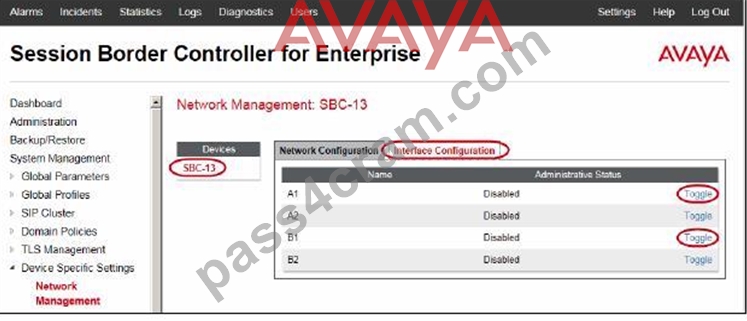
3. Click the Toggle link for both the A1 and the B1 interfaces.
The Administrative Status for both A1 and B1 changes to Enabled:
References: Avaya Aura Session Border Controller Enterprise Implementation and Maintenance (2012), page
203
NEW QUESTION 16
By default, which Codec does Avaya Aura Messaging (AAM) support?
- A. G.729
- B. G.726
- C. G.711
- D. G.722
Answer: C
Explanation:
Explanation
You must configure the Messaging system to use the G.711 encoding format.
Note: The G.711 format provides the highest audio quality especially when voice networks use multiple encodings and decodings. Avaya requires that you use the G.711 encoding format in Messaging systems that support TTY devices.
The G.711 encoding format uses a higher encoding rate than GSM. The G.711 encoding format therefore produces larger files and requires more storage space for messages. Messaging provides customers with adequate storage space for message playback and networking.
References: Administering Avaya Aura Messaging, Release 6.2 Issue 2.2 (December 2013) , page 201
https://downloads.avaya.com/css/P8/documents/100172127
NEW QUESTION 17
The WebRTC snap-in needs to be loaded on which of Avaya BreezeTM cluster?
- A. General Purpose EDP Cluster
- B. Core Platform EDP Cluster
- C. Work Assignment EDP Cluster
- D. Context Store EDP Cluster
Answer: B
Explanation:
Explanation
A cluster profile is a pre-loaded template that contains cluster attributes.
The Core Platform cluster profile: A closed cluster that supports up to 10 Avaya Breeze servers.
NEW QUESTION 18
The media stream in WebRTC is anchored on which Avaya Aura component?
- A. Avaya Aura Media Server (AAMS)
- B. No DSP Resources are required
- C. Avaya Aura Media Gateway G430/G450
- D. G650 Medpro
Answer: A
Explanation:
Explanation
The Avaya WebRTC Snap-in enables users inside or outside the Enterprise to make a secure call from their web browser to any endpoint to which Avaya Aura can deliver calls.
The WebRTC Snap-in supports 1800 simultaneous calls at a rate of 28,000 BHCC in the following deployment model:
1 Avaya Breeze server
1 Avaya Session Border Controller for Enterprise (Avaya SBCE) server
8 Avaya Aura Media Servers
References: Avaya WebRTC Snap-in Reference, Release 3.1 (May 2016), page 26
https://downloads.avaya.com/css/P8/documents/101013939
NEW QUESTION 19
On Avaya Session Border Controller for Enterprise (SBCE), which two ways can be used to view System Logs? (Choose two.)
- A. from EMS web GUI SBCE Dashboard access Logs > System Logs
- B. from CLI execute cat > var > log > Avaya > syslog
- C. from CLI execute cat archive > syslog > ipcs.log
- D. from System Manager web GUI > Alarms and Events
Answer: A,C
Explanation:
Explanation
C: Call Trace data are written to this location:
- /archive/syslog/ipcs/octeon.log
D: Viewing system logsProcedure
1. Log on to the EMS web interface with administrator credentials.
2. Select the Logs option from the toolbar, and click the System Logs menu.
The system displays the Syslog Viewer screen. On this screen, you can specify criteria in the Query Options section to filter the results displayed.
3. In the Start Date and End Date fields, filter the results displayed in a search report to fall within starting and ending dates and times. In previous Avaya SBCE Syslog Viewer windows, there were four separate fields:
Start Date, Start Time, End Date, and End Time.
References: Troubleshooting and Maintaining Avaya Session Border Controller for Enterprise (December
2015), page 21
Avaya Aura Session Border Controller Enterprise Implementation and Maintenance (2012), page 478
NEW QUESTION 20
Which statement about Avaya Aura Presence Services 7.x snap-in licensing is true?
- A. It requires a license file for each snap-in installed.
- B. It does not require a license to work.
- C. It requires a per-user license.
- D. It requires an instance-license.
Answer: B
Explanation:
Explanation
Presence Services snap-in does not require a license to work.
References: Avaya Aura Presence Services Snap-in Reference. Release 7.0.1 (December 2016), page 17
https://downloads.avaya.com/css/P8/documents/101013646
NEW QUESTION 21
When looking at Avaya Aura System Manager - Home > Services > Replication, what is the name of the replica group representing the EDP / Avaya BreezeTM instances?
- A. CollaborationEnvironment_3.1
- B. Engagement Development Platform EDP_7.0
- C. Avaya BreezeTM_7.0
- D. CollaborationEnvironment_7.0
Answer: A
Explanation:
Explanation
Confirming that Avaya Breeze successfully replicates with System Manager Procedure
1. On the System Manager web console, navigate to Services > Replication.
2. In Replica Group column, click CollaborationEnvironment_3.1.
3. In Replica Node Host Name column, locate your newly-deployed Avaya Breeze.
4. After 2 - 15 minutes, verify that the status of the Synchronization Status field is green/ Synchronized. If not, see Repairing replication between Avaya BreezeTM and System Manager References: Avaya Aura Presence Services Snap-in Reference, Release 7.0.1, (December 2016), page 24
https://downloads.avaya.com/css/P8/documents/101013646
NEW QUESTION 22
To set Timers, URI Manipulation, and Header Manipulation that the Avaya Session Border Controller for Enterprise (SBCE) will use when signaling to the far-end server; a profile like "avaya-ru" is provided by default.
When configuring the Server Configuration, you must link to which type of Global profile?
- A. Routing
- B. Topology Hiding
- C. Signaling
- D. Server Interworking
Answer: D
Explanation:
Explanation
The standard Avaya profile "avaya-ru" is cloned for the Call Server Interworking Profile.
The Interworking function of the Global Profiles feature enables the SBCE to function in an enterprise VoIP network using different SIP protocols.
References: Avaya Aura Session Border Controller Enterprise Implementation and Maintenance (2012), page
339
NEW QUESTION 23
To allow trust between Avaya Aura System Manager (SMGR) and Avaya Aura Messaging (AAM), there is a password set when you add the Trusted Server on AAM. This password must match with the password also configured in SMGR.
Which statement about the password in SMGR is true?
- A. It needs to match the Attributes of the Messaging Managed Element in the Inventory.
- B. It needs to match the admin password used to login to SMGR using a web browser.
- C. It needs to match the root password used to login to SMGR command line.
- D. It needs to match the Enrollment Password.
Answer: A
Explanation:
Explanation
Configuring Messaging in the normal operational mode
Before you begin
* Add both the primary and secondary servers as Trusted Servers in the Messaging system.
* Update the Login, Password, and Confirm Password fields with the appropriate trusted server defined on the Messaging system.
Procedure
1. Log on to the Messaging system that System Manager manages.2. Add the secondary System Manager server as Trusted Servers in the Messaging system.
3. Log on to the secondary System Manager server.
4. On the System Manager web console, click Services > Inventory.
5. In the left navigation pane, click Manage Elements.
6. On the Manage Elements page, select the Messaging system that you want to change to the secondary System Manager server.
7. Click Edit.
8. On the Attributes tab, fill the Login, Password, and Confirm Password fields with the corresponding name and password of the Messaging trusted server.
9. Click Commit.
10. Click Inventory > Synchronization > Messaging System, and select the required Messaging element.
11. Click Now.
The secondary System Manager server retrieves all data from Messaging and is now ready to administer and manage Messaging.
References: Administering Avaya Aura System Manager for Release 6.3.11 and later, Release 6.3, Issue 8 (November 2016), page 104
https://downloads.avaya.com/css/P8/documents/101008185
NEW QUESTION 24
If more than one Avaya BreezeTM node is available in the cluster, which statement about redundancy and load-balancing is true?
- A. The Cluster IP address is not used for Presence Services in 7.0. IM clients configure a FQDN instead of IP address which is resolved by a DNS server to all Avaya BreezeTM nodes in the cluster.
- B. IM clients point to any Avaya BreezeTM node SM100 IP address. The client is dynamically informed of alternate Avaya BreezeTM nodes in the cluster.
- C. The list of all Avaya BreezeTM nodes SM100 IP addresses must be configured in the client.
- D. IM clients point to the Leader Avaya BreezeTM node SM100 IP address which redirects the clients to a particular Avaya BreezeTM node based on load-balancing policy.
Answer: D
Explanation:
Explanation
Enable load balancing for a cluster if you want to scale the HTTP services without targeting a particular Avaya BreezeTM server. All the requests are sent to the cluster IP address. When you enable load balancing, two Avaya BreezeTM servers are chosen as the active and standby load balancing servers. The active load balancer distributes the HTTP requests to all the other servers in the cluster in a round robin fashion.
References: Administering Avaya Breeze, Release 3.1 (May 2016), page 16
https://downloads.avaya.com/css/P8/documents/101014143
NEW QUESTION 25
What is the process for establishing a command line session to the AES Management IP Address, and logging in with the default account and default password?
- A. Use PuTTY to SSH to > AES Management IP Addr > using port 22, then enter login=cust password=custpw.
- B. Use PuTTY to SSH to > AES Management IP Addr > using port 22, then enter login=craft password=crftpw.
- C. Use PuTTY to Rlogin to > AES Management IP Addr > using port 21, then enter login=admin password=admin.
- D. Use PuTTY to SSH to > AES Management IP Addr > using port 222, then enter login=admin password=admin01.
Answer: B
Explanation:
Explanation
Use port 22, not port 21 or port 222.
Log in as craft and use the default password.
References: Application Enablement Services Installation and Upgrade Guide for a Bundled Server Release
4.0, page 29
https://downloads.avaya.com/elmodocs2/AES/4.0/02_300356_4.pdf
NEW QUESTION 26
A field engineer runs the Installation Wizard to install the Avaya Session Border Controller for Enterprise (SBCE).
Which statement about the Domain Name Service (DNS) configuration is true?
- A. A DNS address does not need to be configured.
- B. A DNS address always needs to be configured for both the Primary and Secondary DNS, even if only the DNS is available.
- C. A DNS address should not be configured here.
- D. A DNS address needs to be configured, even if it is unused and/or unreachable.
Answer: D
Explanation:
Explanation
The system requires the DNS server to resolve the host names for alarming and remote access name associated with the Avaya Service Center.You must supply a DNS address entry, even if it is unused and/or unreachable.
NEW QUESTION 27
An Avaya Aura Messaging (AAM) server intended to store Voice Messages in Avaya Message Store Mode, and you are configuring that server for integration with an Avaya Aura Core.
In Messaging Administration > Server Settings > Server Role/AxC Address, which Server Role must be chosen at the "Roles for this server" field?
- A. Storage Only
- B. AMSM
- C. Storage & Application
- D. Application Only
Answer: C
NEW QUESTION 28
Which statement about the SIP Entities to support Avaya Aura Presence Services is true?
- A. Only one SIP Entity is built of Type = "Presence Services", which uses the SM100 IP address of the Avaya BreezeTM node.
- B. Two SIP Entities are built to the same SM100 IP address of each node. One is of Type = "Engagement Development Platform", and the other is of Type = "Presence Services".
- C. Only one SIP Entity is built of Type = "Engagement Development Platform", which uses the SM100 IP Address of the Avaya BreezeTM node.
- D. Two SIP Entities are built to the same SM100 IP address of each node. One is of Type = "Engagement Development Platform", and the other is of Type = "Other".
Answer: C
NEW QUESTION 29
......
Get 71300X Braindumps & 71300X Real Exam Questions: https://www.pass4cram.com/71300X_free-download.html